
Your form captured the lead. Marketing sees the submission. Sales doesn't.
That gap is where crm api integration stops being a developer side quest and becomes a revenue problem. A lead that sits in a spreadsheet, lands in the wrong CRM object, or arrives without source data is harder to route, score, and work. Teams usually feel this first as “messy ops.” Then it shows up as slower follow-up, duplicate records, and weak attribution.
Most companies can survive manual imports for a while. They can't scale on them. Companies with integrated systems report customers are up to 58% less likely to churn, and 98% report better retention overall, according to the 2025 State of SaaS Integrations data summarized by PartnerFleet. That's the practical case for doing this properly. Integration isn't just about moving data. It's about preserving context so teams can act on it fast.
If you're still relying on CSV exports, autoresponder hacks, or someone checking submissions by hand, it's worth studying how strong lead capture systems are designed in the first place through examples like these lead generation form patterns.
Table of Contents
- Why Your CRM Is Disconnected from Reality
- Choosing Your Integration's Foundation
- Building the Data Bridge to Your CRM
- Fortifying Your Integration Against Failure
- Ensuring Security, Compliance, and Long-Term Health
- From Data Integration to Business Intelligence
Why Your CRM Is Disconnected from Reality
A disconnected CRM usually isn't missing data. It's missing trustworthy, timely, structured data.
Marketing may generate plenty of submissions, but sales still ends up working stale records because the handoff is broken. Form answers arrive late. UTM fields don't map cleanly. Owners don't get assigned. Qualification answers stay trapped in the form layer instead of landing in contact, company, or lead fields where reps can use them.
That creates a false sense of CRM adoption. The team has a CRM, but the CRM doesn't reflect what's happening right now. It reflects whatever someone imported last.
The real problem isn't volume
Manual work fails long before traffic spikes. It fails when business rules get even slightly complex.
A simple example: one form collects demo requests from new prospects, existing customers, and partners. If a human has to inspect each submission and decide whether to create a lead, update a contact, or route to customer success, latency becomes part of the process. Some records get skipped. Some get duplicated. Some get pushed into the wrong pipeline.
Practical rule: If a submission needs routing logic, ownership logic, or enrichment logic, it shouldn't depend on manual entry.
The same issue shows up with hidden fields and attribution. If the ad campaign, referrer, country, consent state, and product interest don't land in the right CRM properties, your reports will look complete while your workflows misfire underneath.
Why crm api integration fixes the right layer
The point of crm api integration isn't “automation” in the abstract. It's creating a reliable path from captured intent to CRM action.
That means the record should arrive with:
- Correct identity data so duplicate handling works
- Source context so attribution stays intact
- Qualification answers so routing rules can run immediately
- Timestamps and consent signals so operations and compliance aren't guessing later
When teams make this shift, the CRM starts behaving like an operating system instead of a database. Follow-ups happen sooner. Lead queues are cleaner. Reporting stops depending on cleanup projects at the end of the quarter.
Choosing Your Integration's Foundation
The architecture choices you make at the start determine whether the integration stays simple or turns into a maintenance burden. Two decisions matter first: how you authenticate, and how data moves.
Authentication decides your blast radius
For server-to-server integrations, API keys are often the simplest option. They're straightforward, fast to test, and easy to deploy for internal automations. The trade-off is coarse control. If the key leaks, the exposed scope can be broad unless the provider offers strong permission scoping and rotation controls.
OAuth 2.0 is usually the better fit when users connect their own CRM instance. It supports delegated access, token refresh, and cleaner revocation. It's more work up front, but it gives you a safer model for multi-tenant SaaS products.
A practical way to choose:
- Use API keys when the integration is internal, single-tenant, and tightly controlled.
- Use OAuth 2.0 when customers connect their own CRM accounts or when access needs clear revocation boundaries.
- Avoid hard-coded credentials in scripts, CI jobs, or frontend code. Even a good auth model becomes a bad integration if secrets are handled casually.
The auth method isn't just a login detail. It determines who can act, how access is revoked, and how painful incidents become.
Webhooks and polling solve different problems
The second choice is sync strategy. Teams often argue about this as if one is universally better. It isn't.
Webhooks push data when an event happens. That makes them the right default for lead capture, routing, and notifications where timing matters. If a prospect requests a demo, the integration should send that payload immediately so ownership, enrichment, and alerts can run without delay.
Polling checks for changes on a schedule. It's less elegant, but it can be the safer choice when the source system has weak webhook support, when idempotency is harder to guarantee, or when nightly reconciliation is enough.
Here's the practical comparison.
Webhooks and polling solve different problems
| Criterion | Webhooks (Push) | Polling (Pull) |
|---|---|---|
| Data latency | Near real-time when events fire | Depends on interval |
| Infrastructure pattern | Event-driven receiver required | Scheduled job or worker |
| Failure mode | Missed events need replay strategy | Delayed sync if job fails |
| API usage | Efficient for event-based updates | Can waste calls when nothing changed |
| Complexity | Signature validation, retries, idempotency | Simpler logic, heavier repeated requests |
| Best fit | Lead routing, notifications, immediate updates | Reconciliation, backfills, periodic checks |
A lot of mature stacks use both. Webhooks handle the first write. Polling handles reconciliation. That combination catches dropped events, partial failures, and data drift.
If you have to pick one for a fresh lead flow, start with webhooks. If the CRM or upstream app makes event delivery unreliable, add a polling job later for repair rather than using polling as the primary design for everything.
Building the Data Bridge to Your CRM
A crm api integration fails most often before the first successful POST request. Teams open the code editor too early, assume the endpoint shape is obvious, and discover later that they mapped the wrong object, used a deprecated auth flow, or wrote into fields sales doesn't use.
According to GetKnit's crm api integration guidance, as many as 70% of initial integration failures stem from authentication issues or using deprecated endpoints. The fix is boring and effective: audit the docs first, confirm the target objects, and write down the field mappings before you build.
Start with the object model, not the code editor
Most lead capture integrations touch more than one CRM object. A single submission can create or update a contact, attach campaign metadata, create a lead, open an activity, or trigger a workflow. If you don't decide that model early, you'll end up with records in the wrong place and “temporary” patches that never go away.
At minimum, define:
- Target objects. Contact, lead, account, opportunity, custom object, or a mix.
- Record ownership rules. Round-robin, territory, named owner, or queue.
- Upsert keys. Usually email, sometimes external ID, sometimes a composite rule.
- Field-level transformations. Dates, booleans, enums, phone normalization, source values.
For teams that handle payments or commerce events alongside CRM sync, it also helps to review implementation patterns from adjacent integration domains. The architecture lessons in MTechZilla Stripe services are useful because payment and CRM flows share the same operational concerns: retries, idempotency, webhook verification, and event ordering.
A practical payload example
A contact creation request in a REST-style CRM usually looks simple. The danger is that “simple” payloads hide business logic.
{
  "email": "alex@example.com",
  "firstname": "Alex",
  "lastname": "Rivera",
  "job_title": "Operations Manager",
  "company": "Northwind",
  "lead_source": "Demo Request",
  "marketing_opt_in": true,
  "utm_source": "linkedin",
  "utm_campaign": "q1-demo"
}
That payload is only useful if the target CRM expects those exact fields and values. In real projects, you often need to translate:
email_addresstoEmail"yes"totrue"enterprise_demo"to the CRM's allowed picklist value- A free-text date into the CRM's accepted date format
- Two name fields into one display name, or one into two if the CRM requires splitting
Clean payloads don't happen at the endpoint. They happen in the mapping layer.
Here's the part many teams skip: validation before send. If a required field is empty, a picklist value is invalid, or the email format is broken, fail that record deliberately and log why. Don't let the CRM become your first validator.
A lot of input quality problems start upstream. Tightening form rules early reduces downstream cleanup, especially for required fields, formatting, and conditional logic. These form validation examples are a good reminder that validation is part of integration quality, not a separate UX concern.
Mapping and transformation are where integrations succeed or fail
Here, senior integration work differs from a basic connector script. The script moves data. The mapping layer makes the data operational.
A solid mapping spec usually includes:
- Source field name
- Destination field name
- Data type
- Required or optional status
- Transformation rule
- Fallback behavior
- Owner of the rule such as RevOps, marketing ops, or compliance
Common transformations that matter in practice:
Conditional status mapping
If a submission includes “existing customer,” don't create a net-new lead. Route to account management or support.Normalization of campaign values
Marketing tools often produce inconsistent source names. Standardize before writing to the CRM.PII handling rules
File uploads, notes, and free-text fields often contain more sensitive data than expected. Decide what should sync and what should stay out.
A quick implementation walkthrough can help visualize the request lifecycle before you build queueing and retries:
If you get the mapping spec right, the rest of the integration becomes much more predictable. If you don't, the code can be perfectly written and still produce a CRM that sales won't trust.
Fortifying Your Integration Against Failure
A crm api integration that works in staging can still collapse in production for very ordinary reasons: bad payloads, retries without backoff, rate-limit spikes, duplicate events, or silent partial failures. Production resilience comes from deciding how the system behaves when things go wrong.
Handle errors by type
Not every failed API call deserves the same response. Treating all failures as “retry later” creates loops and duplicate writes. Treating all failures as final drops recoverable events.
A better pattern is to classify failures:
- Permanent client errors such as invalid field values or missing required properties. These should stop, log clearly, and move to a review queue.
- Authentication failures that indicate expired tokens, bad credentials, or revoked access. These need token refresh or reauthorization logic.
- Transient failures such as timeouts or temporary platform instability. These are the right place for retries.
- Rate-limit responses that require pacing, not brute force.
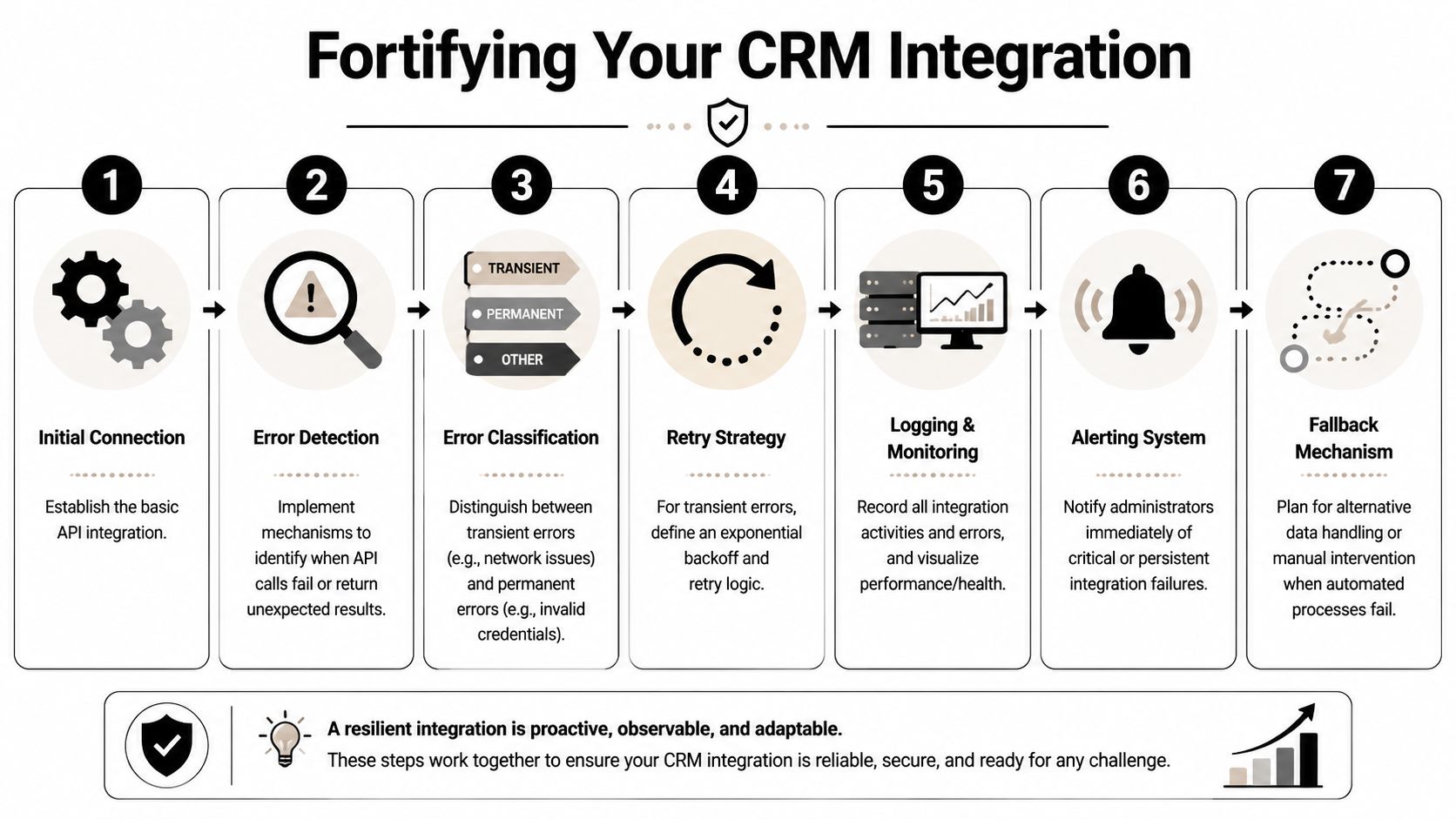
When you retry transient failures, use exponential backoff. Don't immediately resend the same request in a tight loop. Queue it, delay the next attempt, and cap the retry count.
If your retry logic doesn't know why a request failed, it isn't resilience. It's traffic amplification.
Treat rate limits as part of the design
Rate limits aren't edge cases. They're part of the contract. Build for them from day one.
For Salesforce-style CRM integrations, CheckListGuro's crm api integration checklist notes that data mapping mismatches account for 55% of issues in some projects, and recommends monitoring data sync speed below 5 minutes for batch jobs while keeping error rates below 1%. Those are useful operational targets because they force you to think beyond “request succeeded” and into sustained reliability.
The practical controls are straightforward:
- Batch where the API allows it so you reduce call volume.
- Use queues between event ingestion and CRM writes.
- Make writes idempotent so retries don't create duplicates.
- Store request and response context so support can diagnose failures quickly.
- Alert on drift such as rising 429 responses or a growing dead-letter queue.
A brittle integration logs only exceptions. A healthy one logs intent, request identity, retry count, final disposition, and timing.
Ensuring Security, Compliance, and Long-Term Health
Most integration tutorials stop at “use HTTPS” and “store secrets safely.” That's necessary, but it's not enough once you're moving lead data, form uploads, recruiting details, or customer information across systems.
Security starts with credential discipline
Credentials should live in environment variables or a secrets manager, not in source code, not in frontend scripts, and not in shared screenshots from debugging sessions. Rotate them. Scope them. Remove stale connections when ownership changes.
That baseline matters because integrations often outlive the people who built them. Months later, someone inherits a webhook consumer and no one knows which token has access to production CRM records. That's how small mistakes turn into security incidents.

For teams reviewing SaaS integration exposure more broadly, this Affordable Pentesting guide for CISOs is useful because it frames how to test externally exposed workflows without treating “it uses an API” as proof of security.
Compliance lives in the payload
The compliance failure usually isn't the connection itself. It's the field mapping.
If a form captures consent, your CRM payload should carry that consent state into explicit fields. If a user declines marketing, that flag shouldn't disappear because the integration only mapped contact basics. If a free-text field can contain sensitive personal data, decide whether it belongs in the CRM at all.
According to Pointspeak Marketing's crm api integration guide, non-compliant integrations can face fines up to 4% of global revenue under the EU AI Act, and 45% of SaaS CRM integrations fail audits because they sync unhashed PII without proper consent mapping. That's a concrete reminder that compliance isn't documentation layered on top later. It's a design choice in your schema and sync logic.
A practical compliance checklist includes:
- Consent mapping from form checkbox to CRM field
- Data minimization so only required PII is synced
- Auditability through logs that show when and how data was written
- Retention rules that match your legal and operational policies
- Region-aware handling if your process spans multiple markets
A compliant integration can explain why each sensitive field exists, where it goes, and who can access it.
Monitoring is what keeps integrations healthy
Testing in a sandbox is good engineering. Ongoing monitoring is good operations.
You want visibility into:
- Availability of the source and CRM endpoints
- Queue depth so backlogs are visible before sales notices delays
- Latency from submission to CRM write
- Schema drift when upstream fields change
- Audit failures when consent or required fields are missing
Don't only monitor infrastructure. Monitor business outcomes too. If lead routing stops assigning owners, the API may still be healthy while the process is broken. Long-term health comes from watching both the transport layer and the workflow layer.
From Data Integration to Business Intelligence
The value of crm api integration isn't the connector. It's what the connector enables once the data is trustworthy.
When a form submission lands in the right CRM object, with the right owner, source, consent state, and qualification context, teams stop debating which spreadsheet is current. Sales can respond faster. Marketing can trust campaign attribution. RevOps can build automations without compensating for missing fields and duplicate records.
That operational clarity has measurable business value. A Forrester study on Salesforce integrations via an API-led strategy found 445% average ROI over three years, with improved data quality boosting sales forecasting accuracy by up to 32%, as summarized by Integrate.io's analysis of the Forrester findings. That isn't a reward for “having integrations.” It's a reward for implementing them in a way that reduces delay, improves reuse, and makes data usable across the business.
The final shift is mental. Stop thinking of the integration as a pipe between two apps. Treat it as the system that decides whether captured intent becomes action or noise.
If you're working on that next layer after sync quality, this guide on form analytics is a useful companion because analytics shows where submission quality, drop-off, and routing performance start upstream.
If you want to turn forms into a cleaner CRM pipeline without bolting together brittle handoffs, BuildForm is built for that job. It helps teams capture richer data, reduce drop-off, and move submissions into downstream workflows with the structure operations teams need to keep routing, reporting, and follow-up reliable.