
You usually notice a broken vendor registration process when something important goes missing. Finance can’t pay a new supplier because the tax form never arrived. Procurement approved a vendor, but legal never saw the insurance certificate. A promising software partner drops out halfway through a bloated PDF and stops replying. None of that feels like a form problem at first. It feels like an operations problem.
It is a form problem.
A vendor registration form is the front door to your supplier lifecycle. If that door is clunky, slow, or unclear, every downstream step gets harder. If it’s well designed, the form does more than collect data. It pre-qualifies vendors, routes submissions to the right reviewers, enforces basic compliance, and gives your team a clean record to work from.
Table of Contents
- Moving Beyond Manual Vendor Onboarding
- Designing a Frictionless Vendor Experience
- Building with Conditional Logic and Dynamic Flows
- Automating Your Vendor Approval Workflow
- Launching, Testing, and Analyzing Performance
- Ensuring Compliance, Security, and Privacy
Moving Beyond Manual Vendor Onboarding
Manual onboarding looks harmless when volume is low. One spreadsheet. A shared inbox. A folder full of attachments. Then growth hits, and the process starts leaking information at every handoff.
The cost isn’t just admin time. It’s inconsistency. One vendor gets asked for bank details too early. Another never gets asked for diversity certification. A third sends everything by email, and nobody knows which version is current. That’s how duplicate follow-ups, payment delays, and approval bottlenecks become normal.
A modern vendor registration form fixes that by turning intake into a controlled workflow. It standardizes what you collect, when you collect it, and who reviews it. It also changes the first impression you give suppliers. Clean onboarding signals that your company is organized, serious, and easier to work with.
Practical rule: If your team has to manually retype vendor information into another system, the form isn’t finished. It’s only started.
Strong teams also treat the form as the first place to automate repetitive tasks. That means fewer hand-entered records, fewer status-chasing emails, and fewer approval decisions based on incomplete submissions.
The best setups do three jobs at once. They collect accurate data, reduce operational risk, and move vendors toward approval without extra friction. That’s a much better frame than “we need a form for procurement.”
Designing a Frictionless Vendor Experience
Most vendor drop-off happens before review ever starts. The vendor opens the form, sees too many fields, doesn’t understand why you’re asking, and postpones it. Postponed forms often become abandoned forms.
Vendor registration forms have been a core procurement tool since the early 2000s, and the format has changed for a reason. According to Prokuria’s overview of efficient vendor registration forms, old 15-page PDF forms saw completion rates below 20%, while intelligent, mobile-friendly forms improved completion rates to 60-80%. The same shift, using tools like conditional logic and automated validation, reduced onboarding time from weeks to days.
Why long forms fail
Long forms fail for two basic reasons. They mix required data with optional data, and they ask for documents before the vendor understands whether the relationship is worth pursuing.
A cleaner structure groups questions into plain-language sections such as:
- Company identity for legal name, business structure, and primary contact
- Tax and payment setup for the information finance needs later
- Operational fit for product category, geography, fulfillment model, or service scope
- Compliance documents for certifications, insurance, and policy acknowledgments
This isn’t cosmetic. It reduces cognitive load. Vendors can tell where they are, what comes next, and why the request matters.
For teams rebuilding an intake flow, these form design best practices are useful because they focus on field ordering, clarity, and mobile readability rather than decoration.
Recommended Vendor Registration Form Fields
| Field Category | Field Name | Data Type | Rationale & Best Practice |
|---|---|---|---|
| Company Information | Legal business name | Short text | Match the vendor record to contracts, tax documents, and ERP entries. Don’t rely on brand names alone. |
| Company Information | Doing business as name | Short text | Useful when the trading name differs from the legal entity. Make it optional. |
| Company Information | Business structure | Dropdown | Helps finance and legal classify the supplier correctly. Use clear options rather than open text. |
| Company Information | Primary contact name | Short text | Give one accountable person for onboarding follow-up. |
| Company Information | Primary contact email | Use validation so the team isn’t chasing typos later. | |
| Company Information | Primary contact phone | Phone | Helpful when approvals stall and urgent clarification is needed. |
| Company Information | Country and operating regions | Dropdown or multi-select | Important for tax handling, service coverage, and routing to the right internal reviewer. |
| Tax and Finance | Tax ID or VAT number | Short text | Critical for identity verification and payment setup. Use format validation where possible. |
| Tax and Finance | W-9 | File upload | Necessary for many US-based payment workflows. Ask only when the vendor reaches the appropriate stage. |
| Tax and Finance | Banking details | Secure fields | Collect only when the vendor is moving into payment setup. Keep this out of an early qualification form. |
| Commercial Profile | Vendor type | Dropdown | Drives conditional logic. Examples include software provider, contractor, distributor, or marketing agency. |
| Commercial Profile | Product or service description | Paragraph text | Helps category managers and requesters confirm fit without a separate email thread. |
| Commercial Profile | Annual revenue range | Dropdown | Useful for supplier sizing and risk review. Ranges work better than open-entry numbers. |
| Compliance | Certificate of insurance | File upload | Relevant when physical work, facilities access, or liability exposure exists. Hide it for low-risk digital vendors. |
| Compliance | Relevant certifications | Multi-select plus upload | Use this for items such as ISO or security-related documents when applicable. |
| Compliance | Data processing agreement requirement | Yes or no | Important for software and data-handling vendors. Trigger legal review if selected. |
| Operations | EDI or ecommerce integration capability | Multi-select | Useful in retail, SaaS, and ecommerce environments where system compatibility matters. |
| Operations | Service locations or shipping coverage | Multi-select | Needed for physical supply and logistics vendors, not for every vendor type. |
| Acknowledgment | Terms and privacy consent | Checkbox | Sets expectations and records consent before submission. |
Ask only what your team will act on. If nobody reviews a field, remove it or move it later in the lifecycle.
Ask for the next document later
One of the most effective changes is progressive collection. Don’t request every file on day one. Start with enough information to identify the vendor, classify them, and decide whether they should move forward.
Then request the next layer only when there’s a real need. Finance documents after commercial fit. Insurance after scope is confirmed. Security paperwork when the vendor touches customer or employee data.
That approach produces cleaner submissions and fewer half-complete applications. It also respects the vendor’s time, which matters more than many procurement teams admit.
Building with Conditional Logic and Dynamic Flows
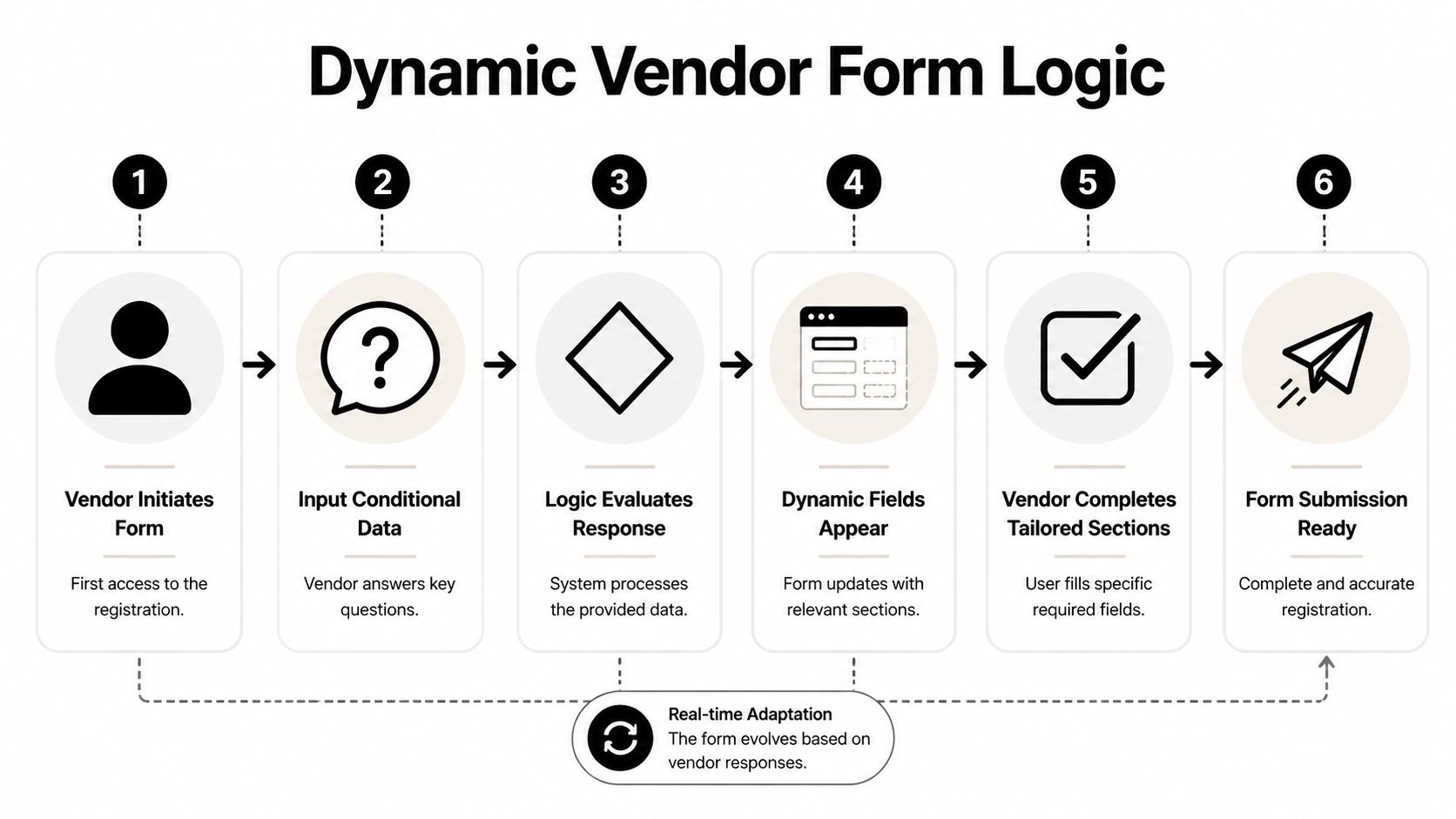
Static forms treat every vendor like they’re the same. They aren’t. A software provider and a construction contractor shouldn’t answer the same questions, upload the same documents, or move through the same path.
That’s where conditional logic turns a vendor registration form from a questionnaire into a working intake system.
Two vendors two different paths
Take a common scenario.
A vendor selects Software Provider as their type. The form should immediately reveal questions about security compliance, data handling, API capability, and agreement requirements. It should hide shipping schedules, warehouse coverage, and fleet details because those fields don’t apply.
A second vendor selects Construction Contractor. Now the logic should do the reverse. Show insurance requirements, safety documentation, site access information, and relevant certifications. Hide software-specific questions that would only slow them down.
No-code tools have changed the game. Instead of maintaining separate forms for every supplier category, teams can use one adaptive flow. Some form platforms support this with visual rule builders, and progressive profiling examples are a helpful way to think about what to show now versus what to ask after initial qualification.
A good dynamic form doesn’t feel shorter because you removed questions. It feels shorter because you removed irrelevant questions.
What the logic should actually do
Conditional logic works best when it governs more than field visibility. In practice, I’d use it for four things.
- Branch by vendor type. Route software firms, service providers, distributors, and contractors into different question sets.
- Control document requests. If a vendor indicates they’ll access sensitive systems, require the security-related attachments. If not, don’t show them.
- Tailor compliance prompts. A vendor operating in one geography may need a different declaration than a vendor operating in another.
- Set internal flags before submission. The form can label the record for finance review, legal review, or security review based on responses.
That last point matters. If you wait until after submission to interpret the form manually, you lose half the benefit of automation.
A practical build pattern looks like this:
- Start with qualification fields such as vendor type, region, and service category.
- Use those answers to reveal the right sections.
- Validate key entries in real time for items like tax identifiers, email addresses, and required uploads.
- Generate a structured submission record that arrives already categorized.
This is also one place where BuildForm can fit naturally. It supports adaptive forms, visual logic, partial submission tracking, and one-line embedding, which is useful when a procurement team wants a dynamic intake experience without handing the project to engineering.
The trade-off is simple. More logic creates a cleaner vendor experience, but only if the rules are maintained. If your categories change and your conditions don’t, the form starts misrouting vendors. Someone on the operations or procurement side has to own the logic as part of the process, not as a one-time setup.
Automating Your Vendor Approval Workflow
A polished intake form can still feed a messy approval process. That’s the next failure point. Submissions come in cleanly, then sit in inboxes while people decide who should review what.

The fix is to automate routing from the moment the vendor clicks submit. Send the record to finance when tax and payment setup is the next required step. Send it to legal when the vendor indicates data processing or contract exceptions. Send it to procurement when commercial review is needed first.
Route by risk not by inbox
Don’t route every vendor through the same approvers. Route by risk, category, and completeness.
If a submission includes higher-risk indicators, treat it differently. If it’s a straightforward low-risk supplier with complete documentation, let it move faster. The approval workflow should reflect your real operating rules, not your org chart.
Useful automations include:
- Internal alerts through Slack or email when a submission enters a new review stage
- Automatic record creation in a CRM, procurement tracker, or workspace database
- Task creation for missing documents instead of vague “please complete” messages
- Status updates sent back to the vendor so they know whether they’re under review, pending more information, or approved
Teams looking for practical patterns can borrow from these workflow automation examples and adapt them to procurement rather than lead capture.
Use evaluation gates instead of opinion
Approval quality improves when the workflow includes clear gates. According to TechnologyMatch’s guidance on vendor selection mistakes, firms using rigorous RFP automation and structured evaluation forms hit 90%+ approval rates, compared with 65% for manual processes. The same source notes that vague criteria cause 40% misalignment, cost-only selection leads to 25% failure within the first year, and a structured process with scored criteria and clear gates can reduce decision bias by 70% and cut cycle times in half.
That applies directly to vendor registration. Intake shouldn’t end with “someone reviews it.” It should feed a repeatable decision model.
What works in practice: define disqualifiers early, score only what matters, and require evidence for claims that affect approval.
Here’s a lean approval pattern:
| Stage | What happens | Why it works |
|---|---|---|
| Intake review | Check form completeness and required attachments | Stops reviewers wasting time on incomplete records |
| Category review | Confirm vendor type, scope, and internal owner | Prevents misrouting and duplicate evaluation |
| Risk review | Trigger finance, legal, or security review based on answers | Keeps high-risk items from slipping through |
| Decision gate | Approve, reject, or request clarification | Creates a clear audit trail |
| System sync | Push the approved record into operational tools | Avoids re-entry and keeps teams aligned |
A short explainer is useful before implementation:
Keep the vendor informed
Silence creates support tickets. It also creates mistrust.
Vendors should receive plain, timed updates. Submission received. Under review. Additional information required. Approved for setup. Not moving forward. These don’t need to be long. They need to be clear and automatic.
When teams skip this, suppliers resend documents, chase updates, and fill your inbox with avoidable questions. The workflow becomes slower for everyone.
Launching, Testing, and Analyzing Performance
Teams often test whether the form submits. They don’t test whether the form works well under real conditions. Those are different things.
Launch week is where you find hidden friction. A question that made sense internally confuses outside vendors. A file upload works on desktop but becomes awkward on a phone. A conditional branch hides the wrong section and creates incomplete records.

Pre launch checks that catch real problems
Before going live, run test submissions with people who weren’t involved in building the form. Give them real scenarios, not abstract instructions.
Use a checklist like this:
- Test by vendor type. Submit as a software vendor, contractor, distributor, and service partner if those categories exist.
- Test on mobile. Don’t assume a responsive layout is enough. File upload, dropdown length, and section spacing matter.
- Break the logic on purpose. Try incomplete answers, wrong file types, and mismatched entries to confirm validation works.
- Review notifications. Make sure the right people receive the right alerts with useful context.
- Confirm downstream records. Check that approved submissions land correctly in your tracking or procurement system.
A vendor registration form should also be checked for language. “Upload compliance document” is internal shorthand. “Upload certificate of insurance” is clearer. Small wording changes often remove the need for follow-up emails.
What to measure after go live
Once the form is live, treat it like an operational asset. Track where vendors finish, where they leave, and which devices produce the most friction.
According to the Illinois SFA manual research summarized in the verified data, 60%+ of SMB traffic is mobile, yet mobile-first design for vendor forms is often neglected, contributing to 40% abandonment rates in registrations. The same source notes that many portals fail to recover partial submissions, leaving 25% of abandoned forms unretrieved. It also states that accessible, responsive forms can boost completion rates by 30%, and cites a projection that 70% of SMB forms will be AI-powered by 2026.
The numbers matter, but the operational takeaway is simple. Mobile performance and partial completion tracking aren’t nice extras. They’re core form metrics.
Focus on:
- Completion rate so you can see whether the form is broadly workable
- Field-level drop-off so you know which question or upload request creates friction
- Average time to complete so you can tell whether the flow feels heavier than intended
- Mobile versus desktop behavior so you can find layout and usability issues
- Partial submission recovery so promising vendors don’t disappear after starting
Watch the first serious drop-off point, not just the final conversion number. That’s usually where trust breaks or effort spikes.
A good review rhythm is simple. Check the data after launch, after the first batch of live vendors, and any time your process or supplier mix changes. Teams that do this consistently catch issues early. Teams that don’t usually blame “vendor responsiveness” for problems their form created.
Ensuring Compliance, Security, and Privacy
A vendor registration form often asks for sensitive business information. Sometimes it asks for tax IDs, bank details, legal names, insurance documents, or personal contact information. If the form doesn’t signal trust, vendors hesitate. If the process isn’t secure, hesitation is justified.
Trust is part of completion rate
Security isn’t only a backend concern. It affects whether vendors finish the form at all.
The risk is easy to underestimate. According to LA County’s notice about vendor phishing threats, vendors are actively targeted by phishing emails that impersonate official programs. The same verified data notes that many registration portals lack integrated security education or real-time alerts, leaving small businesses exposed to business email compromise, which affects 20% of SMBs according to the cited 2025 FBI data.
That should change how you design the experience. Vendors need to know they’re in the right place, why you’re asking for sensitive information, and how your team will use it.
Security controls that belong in the form experience
A secure vendor registration form should include:
- Clear identity signals such as company branding, a recognizable domain, and consistent confirmation messaging
- Consent language and privacy access so vendors can review how their data is handled
- Secure storage and encryption for tax, banking, and compliance documents
- Role-based access internally so only the right reviewers can view sensitive fields
- Anti-phishing guidance near sensitive steps, especially where the vendor is asked for tax or payment information
If your team is dealing with regulated data or wants a useful benchmark for handling sensitive AI-related workflows, these requirements for HIPAA compliant ChatGPT offer a practical way to think about access controls, data handling, and vendor trust, even outside healthcare.
A vendor form doesn’t need to feel heavy to be secure. It needs to feel deliberate. Vendors can tell the difference between a careful process and a risky one almost immediately.
If your current vendor registration form still relies on static fields, manual follow-up, and disconnected approvals, it’s worth rebuilding the flow from the first question through final routing. BuildForm is one option for teams that want adaptive forms, no-code logic, analytics, and integrations in a single system so vendor intake becomes part of a working operational process rather than another admin queue.